 See all blog posts
LangChain4j streaming chat works with Jakarta WebSocket


The introduction of large language models (LLMs) opens the possibility for users to interact in natural language with your application. However, as your application becomes more complex, your users might need to wait longer for large responses from the LLM. You can improve the user experience by streaming the response to the user as the LLM generates it, in doing so reducing delays and increasing perceived responsiveness.
In this post, you can explore how to stream responses from your LLM to your application client UI with Jakarta WebSocket. To learn more about how Jakarta WebSocket works, check out the Bidirectional communication between services using Jakarta WebSocket guide.
Try out the streaming chat sample application
You can check out a sample application that integrates LangChain4j’s streaming chat with a Jakarta EE application. Clone the sample-langchain4j repository and go into the streaming-chat project by using the following commands:
$ git clone https://github.com/OpenLiberty/sample-langchain4j.git
$ cd sample-langchain4j/streaming-chat
Install Java 21 or newer if you haven’t already. You can use IBM Semeru Runtimes as your chosen Java runtime. Set the JAVA_HOME environment variable to your Java installation path.
The application supports the GitHub, Ollama, and Mistral AI providers. Set up an AI provider by following the Prerequisites and Environment Set Up instructions.
Start the sample application by running ./mvnw liberty:dev if you are on MacOS or Linux, and mvnw.cmd liberty:dev if you are on Windows. When the server starts, go to the http://localhost:9080 URL, send a question (for example "What are large language models?"), and check out how the response is streamed token by token.
How does the application work?
From a high level, the user connects from their front end to a WebSocket endpoint. Each user message is passed to the AI service, which sends a request to the LLM provider. As the response is generated, the WebSocket endpoint sends each token to the user, rather than waiting until the entire response is generated.
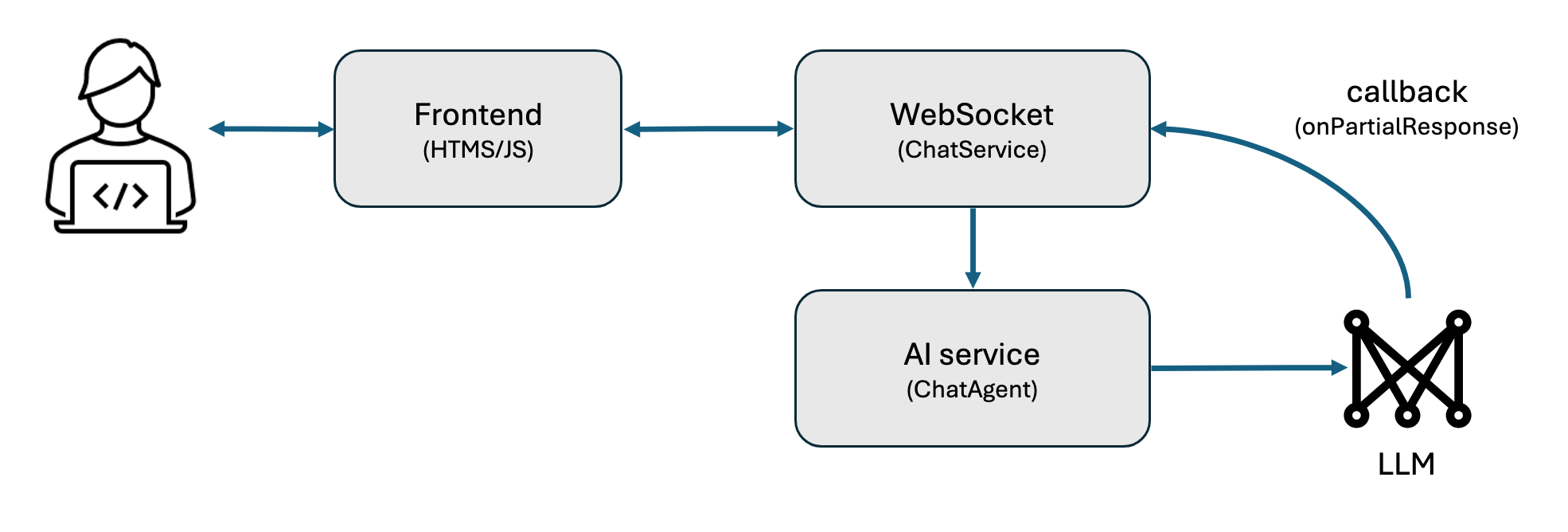
The application builds a streaming chat model from a provider of your choice and sets a 200 token limit on the response. For example, the following code builds a streaming chat model that uses Ollama’s Llama3.2 model.
StreamingChatModel streamingModel = OllamaStreamingChatModel.builder()
    .baseUrl("http://localhost:11434")
    .modelName("llama3.2")
    .numPredict(200)
    .build();
See the ModelBuilder.java file to learn more.
An assistant interface with a chat method is declared for LangChain4j to implement. Multiple concurrent user conversations can exist at the same time by passing in a unique session ID to the chat method. The ChatMemoryAccess interface provides a method that deletes conversation history for when a user exits. You can also specify a system message to influence the assistant’s responses, such as being knowledgeable about the Open Liberty application server.
interface StreamingAssistant extends ChatMemoryAccess {
    @SystemMessage("You are a helpful chat bot knowledgeable about the Open Liberty application server runtime.")
    TokenStream streamingChat(@MemoryId String sessionId, @UserMessage String userMessage);
}
LangChain4j builds an AI service that implements the interface and uses the streaming chat model from earlier, with the 10 most recent messages of each conversation preserved.
StreamingAssistant assistant = AiServices.builder(StreamingAssistant.class)
    .streamingChatModel(streamingModel)
    .chatMemoryProvider(sessionId -> MessageWindowChatMemory.withMaxMessages(10))
    .build();
See the StreamingChatAgent.java file to learn more.
WebSocket endpoint
A JakartaEE WebSocket annotation declares a server endpoint that the front end can connect to.
@ServerEndpoint("/streamingchat")
public class StreamingChatService {
    ...
}
For each user message, the assistant generates a response. As the model generates the response, LangChain4j calls the callback that is given to .onPartialResponse(…) with each token, which gets sent through the WebSocket by .sendText(token). If the response was cut short because of the token limit, the server ends the response with an ellipsis (…). The end of the response is signaled by sending an empty string.
@OnMessage
public void onMessage(Session session, String message) throws Exception {
    CompletableFuture<ChatResponse> response = new CompletableFuture<>();
    assistant.streamingChat(session.getId(), message)
        .onPartialResponse(token -> {
            try {
                session.getBasicRemote().sendText(token);
                Thread.sleep(100);
            } catch (Exception error) {
                throw new RuntimeException(error);
            }
        })
        .onCompleteResponse(response::complete)
        .onError(response::completeExceptionally)
        .start();
    if (response.get().finishReason() == LENGTH)
        session.getBasicRemote().sendText(" ...");
    session.getBasicRemote().sendText("");
}
The error message is sent back to the user when errors occur.
@OnError
public void onError(Session session, Throwable error) throws Exception {
    session.getBasicRemote().sendText("My failure reason is:\n\n" + error.getMessage());
    session.getBasicRemote().sendText("");
}
The chat history of the user is removed by calling .evictChatMemory(…) upon disconnect.
@OnClose
public void onClose(Session session) {
    assistant.evictChatMemory(session.getId());
}
See the StreamingChatService.java file to learn more.
Front end connection
On the front end, a WebSocket connection to the server endpoint is created.
// Connect to websocket
var webSocket = new WebSocket('/streamingchat');
When the user presses the enter key, the message is sent to the server through the WebSocket created earlier and sending messages is disabled temporarily.
function sendMessage() {
    var message = input.value;
    appendMessage('my-msg', message, new Date().toLocaleTimeString());
    appendMessage('thinking-msg', 'thinking...');
    webSocket.send(message);
    input.value = '';
    sendButton.disabled = true;
};
The following code adds each received token to the AI’s last message element. If the front end receives an empty string, the response ends and the front end re-enables the user to send messages.
webSocket.onmessage = function (event) {
    if (event.data != '') {  // stream ends with empty string
        if (messages.lastChild.querySelector('.thinking-msg')) {  // if this is the first token
            messages.removeChild(messages.lastChild);
            appendMessage('agent-msg', '', new Date().toLocaleTimeString());
        }
        messages.lastChild.querySelector('.agent-msg').textContent += event.data;
    } else {
        sendButton.disabled = false;
    }
};
An error message is displayed if the WebSocket was closed for any reason.
webSocket.onclose = function (event) {
    ...
    appendMessage('agent-msg', 'The connection to the streaming chat service was closed.');
    sendButton.disabled = true;
};
See the streamingChat.js file to learn more.
Conclusion
In this post, we explored how to use LangChain4j, set up a WebSocket endpoint, and stream responses to the front-end. By streaming the response, your users experience a shorter delay between sending a message and receiving a response, even if it is still being generated.
What’s next?
Check out the Open Liberty guides for more information and interactive tutorials that walk you through other Jakarta EE and MicroProfile APIs with Open Liberty.


